
Nonprofit & Church
AI tools for nonprofits and churches: what to use and what it costs
Small organisations run on goodwill and evenings. Here's how AI takes the first draft of the thank-you letters, the grant narrative, the weekly notice, and the volunteer reminder off your plate, while donor and pastoral information stays exactly as private as your supporters expect.
What the setup unlocks: All 4 budget plans · copy-paste AI wording · app connections · setup checklist · cheaper swaps · optional monthly research, a briefing and plan updates
7-day money-back guarantee, no questions asked.
Claude
Pro
Canva
Pro
Buffer
Essentials
Who does what in this plan
Every job in the plan has an owner: you, or you with AI doing the work for you to approve. In your own account you can change any of them.
- You4
- You + AI8
Jobs this plan keeps human
Pastoral care and counselling
Care for a person in need is human work.
Safeguarding records and concerns
These never go into an AI tool.
Donor conversations and asks
Gratitude and giving rest on relationships.
Final approval of anything public
A named person approves what goes out in the organisation's name.
Your website
A site for a business like this, drafted by the software
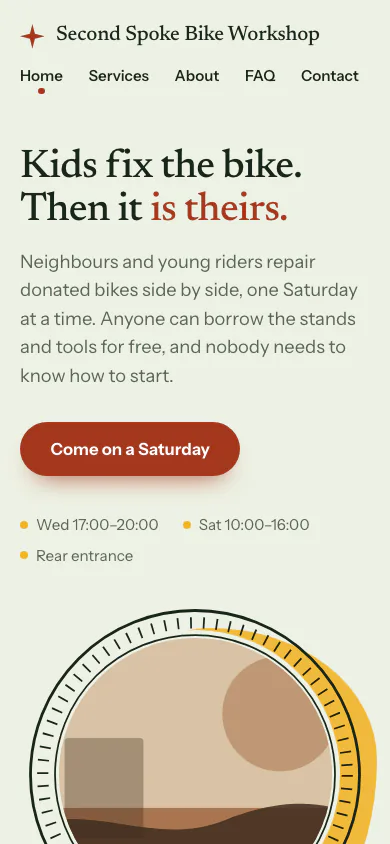
Second Spoke Bike Workshop is a made-up community bike workshop. The software read its facts and picked the Compass Look.
Why this Look
Compass tells the story first and sets the ways to take part as large rows, so a volunteer workshop leads with why it exists rather than with a donate button.
Yours is drafted from your own answers. You edit it, and you publish it.
See all the examples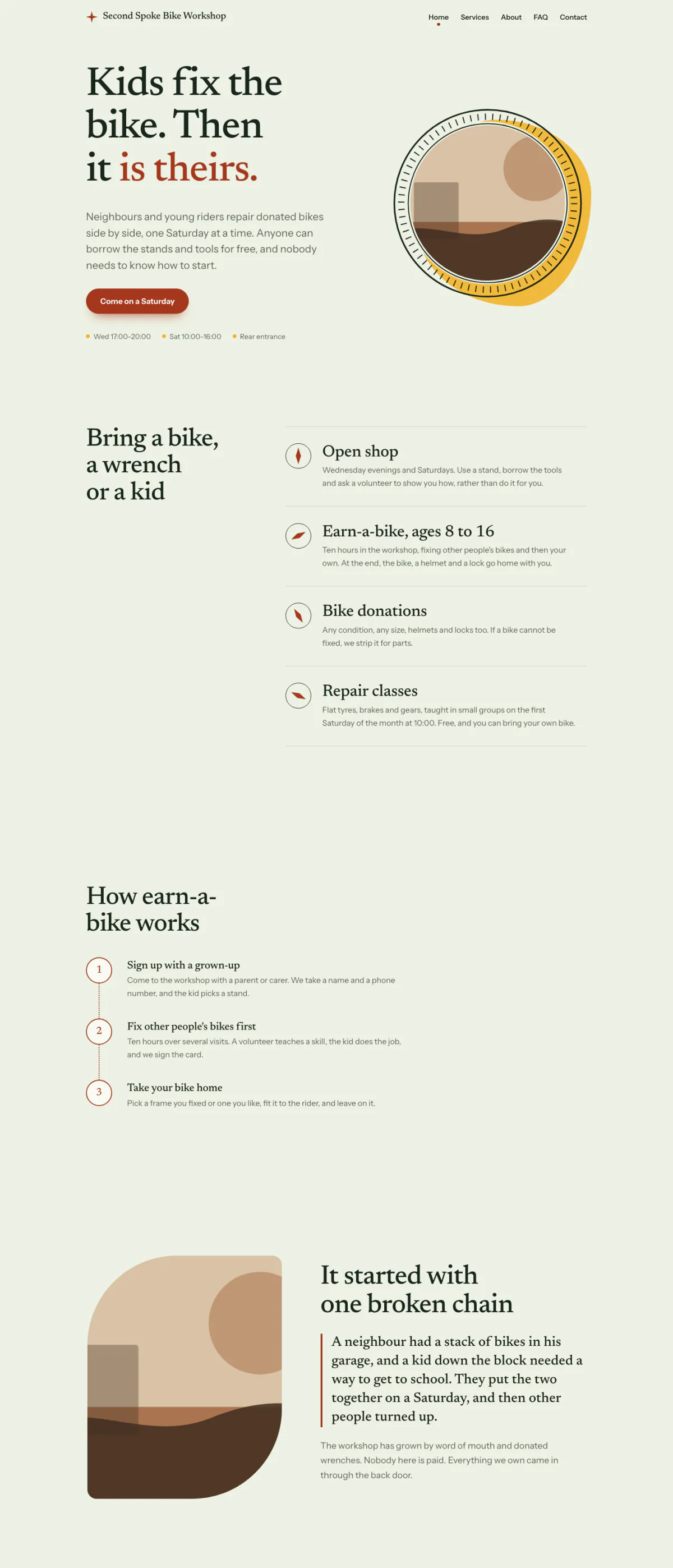
Hover or focus to scroll through the pageA still of the whole page
Pick your budget
Free on this page: the full $50 starter set of tools and every section of the sample plan. The $99 one-time setup unlocks all 4 budgets and setup steps for your plan, adapted to your answers, with AI drafts checked by a person. Optional Kept current at $29/month adds monthly business research, a briefing and plan updates. Starts only if you say yes. Stop any time and keep your plan.
What this budget buys
Letters, newsletters, and social posts drafted from your notes.
$41/mo
3 tools
- ClaudeGeneral AI assistants
- CanvaImage & design AI
- BufferSocial media AI
- Which plan to pick for each tool
- The order to set them up in
- A cheaper swap for each one
Unlocked by the one-time setupFind my plan
- General AI assistants$20
- Image & design AI$15
- Social media AI$6
- Left for usage and growth$59
Leaves about $59/mo of your budget for usage costs and growth.
- Dapols setup
- $99 once
- AI development projects reviewed on Clutch
- $10,000–$49,999 per project
Source: Clutch AI pricing guide (checked Sep 23, 2026)
Preview — the $50 starter plan is shown in full · We re-check these prices in batches and show the date of the last check, but vendors change them whenever they like — always confirm on the vendor's site before you buy.
Cheaper swaps for every pick
We don't just name one tool. For each pick we show money-saving alternatives that do the same job — and the $50 starter budget is your leanest set of tools if you want the cheapest credible setup.
Smart swaps
Same job, different budget. Swap any pick for one of these if it fits you better.
Everything inside this plan
What this looks like day to day
In plain words — no tool names, no jargon. AI drafts; you approve.
- — Each gift gets a personal thank-you drafted the same week, and a named person reads it before it goes.
- — The newsletter and weekly notice start from your bullet notes instead of a blank page at midnight.
- — Grant answers reuse wording that has already been approved, with gaps marked for a real figure.
- — Volunteers get a shift reminder drafted for you to approve, so the rota stops living in one person's texts.
- — Pastoral and safeguarding notes never go into any of these tools. Everything else is a draft until someone approves it.
Your first week
One task a day, none over twenty minutes.
- Day 1Draft three thank-you letters for this month's gifts from a short note each, and send the ones you are happy with. · ~20 min
- Day 2Write your one-page privacy line: what never goes into AI, and which tools may hold donor details. · ~15 min
- Day 3Turn this week's bullet notes into a newsletter draft and edit it into your voice. · ~20 min
- Day 4Collect your best past grant answers into one document for future drafts. · ~20 min
- Day 5Set up a reminder for next week's volunteer shifts from your rota sheet. · ~20 min
Ready-to-use AI wording inside
· 4Donor thank-you letter · paste into Claude or ChatGPT
Here is one of them in full.
Write a thank-you letter to [FIRST NAME] for their gift to [ORGANISATION]. What their support makes possible this season: [ONE OR TWO REAL, SPECIFIC FACTS]. Warm, personal, under 150 words, signed by [NAME, ROLE]. Do not invent stories, outcomes, or numbers beyond what I have given you.
The other 3 are in the unlocked plan, each with a note on when to use it.
AI helpers & app connections are part of the plan
· 4Ready-made AI helpers with safety rules, plus the app connections that plug your AI into the apps you already use.
One of them, in full:
- Supporter thank-you agent — Drafts a personal thank-you for each new gift or volunteer sign-up from the sheet row, in your organisation's voice, and leaves it for a named person to approve.
The remaining 3 are in the unlocked plan, with the safety rules set for your business.
How to set it up
Step-by-step, in plain English. Included with the plan:
- 1Decide in writing what never goes into an AI tool: pastoral and care notes, safeguarding records, and anything identifying a vulnerable person. Donor names and gift details go only into tools on business terms, never a personal free account.
- 2Collect three past letters, one newsletter, and one successful grant answer into a single document so every draft starts in your voice.
- Steps 3–4 are in your unlocked plan
The one-time setup unlocks the full step-by-step setup sequence and every ready-made automatic job, customized to your answers.
Get my plan — 2 minutes, then $99
Automatic jobs you'll set up
- Gift → thank-you draftMedium2–4 hrs/mo
- Volunteer rota remindersEasy2–3 hrs/mo
- 1 more automatic jobs come with the unlocked plan
Full how-to for each automatic job is included in the plan.
What to skip (for now)
Keep donor and pastoral data on your own computer.
Supporter records and anything touching pastoral care are exactly the data that should not travel to a cloud chatbot. A model running on your own machine can draft letters and notices from that material with nothing leaving the office.
Free local runner
Ollama- Laptop (16GB RAM): A smaller open model handles thank-you letters, notices, and reminders well.
- Desktop (32GB+ RAM or a GPU): A larger open model gives better structure on grant narratives and longer reports, still fully offline.
Any recent laptop with 16GB of RAM runs a useful model. Pastoral and safeguarding notes still stay out of every tool, local or not.
Setup — no cost, no account
- Download Ollama for free from ollama.com — no account or credit card needed.
- Pull a model with one command in your terminal (or search for one in the app), e.g. a Llama, Qwen, or Mistral model sized for your hardware.
- Chat with it directly, or point tools that support a custom/OpenAI-compatible API endpoint at Ollama's local address instead of a paid API key.
- Everything runs on your own machine — no internet needed after the model downloads, and no data ever leaves your device.
Monthly research and updates, if you choose.
Your one-time purchase unlocks the full plan: setup steps, guides for each automatic job, ready-to-use AI wording and app connections, with AI drafts checked by a person. Nothing continues after that purchase. About a month later, we ask whether you want Kept current: monthly search, AI-visibility and competitor research, a short briefing, plan re-assessment, model notes, price alerts and dated Friday updates. It starts only if you say yes. Stop any time and keep your plan.
7-day money-back guarantee, no questions asked.
You're not left alone with it
Every plan includes consultation for the specific questions your business throws up — a step that doesn't match your setup, a tool you already pay for, a price that moved. A consultant at Dapols answers within 24–48 working hours. It isn't instant, and it isn't a bot you argue with.
Consultation with a person, up to 4 times a month
Bigger or more complex?
If your scope is bigger than one plan — several jobs, unusual systems, or a connection that needs a person — that's a custom engagement, quoted and invoiced directly, not through our checkout.
Questions about AI tools for nonprofits and churches
What does AI cost for nonprofits and churches?
Finding your plan is free: a short questionnaire, no card. The full plan is $99, paid once. The tools it names are bought from their own makers at the monthly budget you choose, and each one shows its price and the date we checked it. Dapols takes no share of what you sell or spend. Refunds are available for 7 days.
How long does it take to set up?
You get the whole plan the moment you pay. It starts with a first week of one small task a day, then a 90-day roadmap for the rest, so you set up one tool at a time, at your own pace. Dapols does not log in to your accounts or set the tools up for you.
What stays with me, and what does AI do?
Every job in the plan is labelled: yours to keep, or AI does the work and you approve it. In this plan, jobs kept with you include Pastoral care and counselling, Safeguarding records and concerns, and Donor conversations and asks. Nothing is sent, posted, bought or published on your behalf.
Is it a subscription?
No. The $99 is charged once and nothing renews by itself. There is an optional $29/month subscription that keeps your research and prices current. It starts only if you say yes, and you can stop any time and keep everything already delivered.