
Solo SaaS Founder
AI tools for solo software founders: what to use and what it costs
You're building software solo. Here's how to spend your AI budget so you ship faster, support customers, and handle the busywork — without hiring.
What the setup unlocks: All 4 budget plans · copy-paste AI wording · app connections · setup checklist · cheaper swaps · optional monthly research, a briefing and plan updates
7-day money-back guarantee, no questions asked.
Claude
Pro
OpenCode
Free / BYOK (open source)
OpenRouter
Pay-as-you-go
GitHub Copilot
Free
Who does what in this plan
Every job in the plan has an owner: you, or you with AI doing the work for you to approve. In your own account you can change any of them.
- You4
- You + AI8
Jobs this plan keeps human
Deploying to production
A bad release hits every customer, so a person presses the button.
Refunds and billing disputes
Money decisions need a person who can see the whole customer story.
Talking to your first customers
Early conversations teach you what to build, and no summary replaces them.
Setting your prices
Price is a bet about your business that only you can make.
Your website
A site for a business like this, drafted by the software
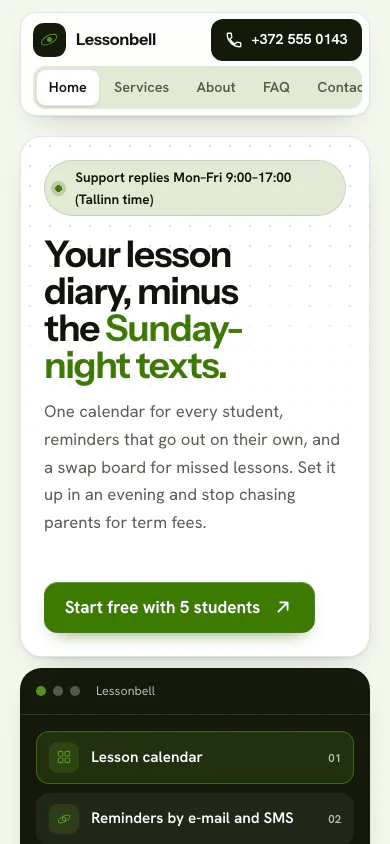
Lessonbell is a made-up scheduling app for music teachers. The software read its facts and picked the Orbit Look.
Why this Look
Orbit lays the app's features out as a bento grid of small tiles, which suits a product made of five simple tools rather than one big promise.
Yours is drafted from your own answers. You edit it, and you publish it.
See all the examples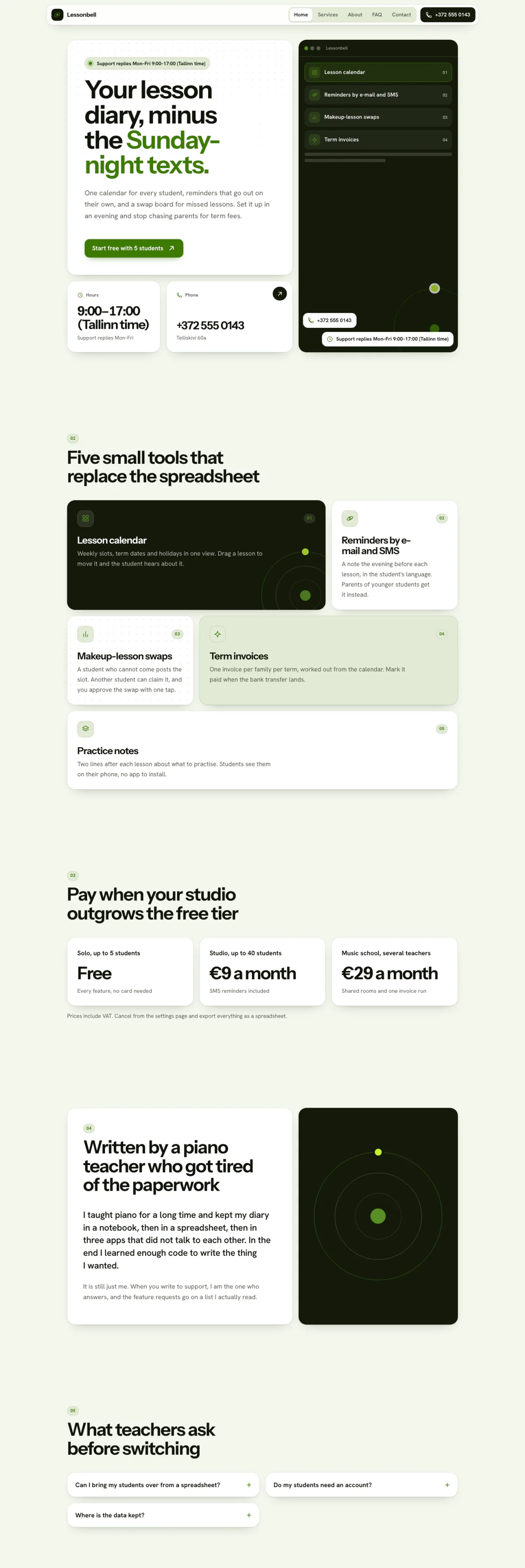
Hover or focus to scroll through the pageA still of the whole page
Pick your budget
Free on this page: the full $50 starter set of tools and every section of the sample plan. The $99 one-time setup unlocks all 4 budgets and setup steps for your plan, adapted to your answers, with AI drafts checked by a person. Optional Kept current at $29/month adds monthly business research, a briefing and plan updates. Starts only if you say yes. Stop any time and keep your plan.
What this budget buys
Ship solo on a shoestring — free + cheap, coding-heavy.
$30/mo
5 tools
- OpenCodeCoding AI
- FathomMeeting assistants
- ClaudeGeneral AI assistants
- OpenRouterModel & API platforms
- GitHub CopilotCoding AI
- Which plan to pick for each tool
- The order to set them up in
- A cheaper swap for each one
Unlocked by the one-time setupFind my plan
- General AI assistants$20
- Coding AI$10
- Left for usage and growth$70
Leaves about $70/mo of your budget for usage costs and growth.
- Dapols setup
- $99 once
- AI development projects reviewed on Clutch
- $10,000–$49,999 per project
Source: Clutch AI pricing guide (checked Sep 23, 2026)
Preview — the $50 starter plan is shown in full · We re-check these prices in batches and show the date of the last check, but vendors change them whenever they like — always confirm on the vendor's site before you buy.
Cheaper swaps for every pick
We don't just name one tool. For each pick we show money-saving alternatives that do the same job — and the $50 starter budget is your leanest set of tools if you want the cheapest credible setup.
Smart swaps
Same job, different budget. Swap any pick for one of these if it fits you better.
Instead of Claude:
- GLM (Z.ai) · API (pay-as-you-go) · $18/mo — Heavy coder on a budget — pay per token at some of the lowest rates going, and it drops into Claude Code.
- ChatGPT · Plus · $20/mo — Prefer OpenAI? Same price, with deep research and image generation.
- DeepSeek · Usage-based — Very heavy usage — pair with OpenCode and pay cents per million tokens.
Instead of OpenRouter:
- DeepSeek · Usage-based — Go direct to DeepSeek for the cheapest heavy usage.
- GLM (Z.ai) · API (pay-as-you-go) · $18/mo — Go direct to GLM for some of the cheapest per-token coding rates.
- Qwen (Alibaba) · Free — Alibaba's Qwen is similarly cheap for high-volume work.
- OpenAI API · Usage-based — Mostly routing to OpenAI anyway? Go direct and use its low-cost small model tier for high-volume drafting and sorting — billed per token, no platform fee on top. Keep prompts short: very long ones bill at a higher rate.
Instead of GitHub Copilot:
- OpenCode · $10/mo — Free agent plus your own cheap model key.
- GLM (Z.ai) · API (pay-as-you-go) · $18/mo — Pay-per-token GLM API that drops into Claude Code / Cline.
Instead of Cursor:
- GitHub Copilot · Pro · $10/mo — Cheaper if you mainly want completions and chat.
- GLM (Z.ai) · API (pay-as-you-go) · $18/mo — Use Claude Code / Cline with the GLM API — heavy coding for a few dollars in tokens, not a subscription.
- OpenCode · $10/mo — Free agent — bring a DeepSeek or Qwen key for near-zero cost.
Instead of Intercom Fin:
- Tidio · Starter · $29/mo — Far cheaper SMB chatbot with Lyro AI.
AI stack vs hiring — what you'd keep
Compare the yearly cost of a hire against the AI tool stack that does the repetitive work.
This stack includes usage-based pricing, so the exact monthly cost depends on volume — see the live prices below.
This compares cost only, and deliberately understates hiring (it excludes recruiting, onboarding, equipment, software, and management overhead). An AI stack does specific tasks with your oversight — it doesn't replace judgment, relationships, or accountability. The plan is a one-time cost added to year one.
Salary source: U.S. BLS OES, May 2023 (SOC 15-1254) · U.S. BLS Employer Costs for Employee Compensation
See if this is your planEverything inside this plan
What this looks like day to day
In plain words — no tool names, no jargon. AI drafts; you approve.
- — Support replies get drafted from your own docs, so the inbox stops interrupting the build.
- — Tests, reviews, and the boring refactors get a first pass from a coding agent that you read before merging.
- — Errors and analytics get summarised weekly with what to fix first, instead of a dashboard you never open.
- — Release notes and changelogs get written from merged PRs rather than skipped.
- — Everything is a draft until you approve it — a code review and a support reply both still go out under your name.
Your first week
One task a day, none over twenty minutes.
- Day 1Point your coding agent at one open issue and have it draft the fix and a test. Read it properly before merging. · ~20 min
- Day 2Give your assistant your product docs and have it draft replies to today's support emails. · ~20 min
- Day 3Have it summarise last week's errors and analytics and pick the one thing to fix. · ~15 min
- Day 4Generate release notes from your merged PRs and publish them. · ~15 min
- Day 5Route your signups, support mail, and billing events into one place so you stop checking three tabs. · ~20 min
Ready-to-use AI wording inside
· 7Plan a feature before you build it · paste into ChatGPT or Claude
Here is one of them in full.
I'm a solo founder building [APP, in one line]. I want to add [FEATURE]. Before I write code: list the 3-5 smallest steps to ship it, the edge cases I'll likely forget, and one simpler alternative I should consider. Keep it tight and practical.
The other 6 are in the unlocked plan, each with a note on when to use it.
AI helpers & app connections are part of the plan
· 7Ready-made AI helpers with safety rules, plus the app connections that plug your AI into the apps you already use.
One of them, in full:
- Nightly QA agent — Runs your test suite and clicks through your critical user flow every night, then leaves you a morning summary of anything that broke.
The remaining 6 are in the unlocked plan, with the safety rules set for your business.
How to set it up
Step-by-step, in plain English. Included with the plan:
- 1Pick one AI coding assistant and connect it to your GitHub repo — let it write tests and review PRs first, then features.
- 2Set up your general assistant with your product docs so it can answer 'how do I…' questions and draft support replies.
- Steps 3–4 are in your unlocked plan
The one-time setup unlocks the full step-by-step setup sequence and every ready-made automatic job, customized to your answers.
Get my plan — 2 minutes, then $99
Automatic jobs you'll set up
- Draft support repliesMedium4–8 hrs/mo
- Weekly bug & analytics sweepMedium2–4 hrs/mo
- 1 more automatic jobs come with the unlocked plan
Full how-to for each automatic job is included in the plan.
What to skip (for now)
Prefer to run AI locally? It's free after setup.
You're already comfortable with a terminal, and a coding agent sends a lot of your codebase to whichever model you point it at. Running an open-weight model on your own machine costs nothing per month, works without internet, and never sends your code anywhere.
Free local runner
Ollama- Laptop-friendly (8–16GB RAM): A smaller open model — good for quick chat, autocomplete, and lighter coding help.
- Serious coding (24GB+ RAM or a 12GB+ VRAM GPU): A larger open model gets noticeably closer to hosted-model quality for real coding and refactoring work.
Check ollama.com/library for current model sizes and pick one that fits your RAM/VRAM — bigger models need more memory but reason better.
Setup — no cost, no account
- Download Ollama for free from ollama.com — no account or credit card needed.
- Pull a model with one command in your terminal (or search for one in the app), e.g. a Llama, Qwen, or Mistral model sized for your hardware.
- Chat with it directly, or point tools that support a custom/OpenAI-compatible API endpoint at Ollama's local address instead of a paid API key.
- Everything runs on your own machine — no internet needed after the model downloads, and no data ever leaves your device.
Monthly research and updates, if you choose.
Your one-time purchase unlocks the full plan: setup steps, guides for each automatic job, ready-to-use AI wording and app connections, with AI drafts checked by a person. Nothing continues after that purchase. About a month later, we ask whether you want Kept current: monthly search, AI-visibility and competitor research, a short briefing, plan re-assessment, model notes, price alerts and dated Friday updates. It starts only if you say yes. Stop any time and keep your plan.
7-day money-back guarantee, no questions asked.
You're not left alone with it
Every plan includes consultation for the specific questions your business throws up — a step that doesn't match your setup, a tool you already pay for, a price that moved. A consultant at Dapols answers within 24–48 working hours. It isn't instant, and it isn't a bot you argue with.
Consultation with a person, up to 4 times a month
Bigger or more complex?
If your scope is bigger than one plan — several jobs, unusual systems, or a connection that needs a person — that's a custom engagement, quoted and invoiced directly, not through our checkout.
Questions about AI tools for solo software founders
What does AI cost for solo software founders?
Finding your plan is free: a short questionnaire, no card. The full plan is $99, paid once. The tools it names are bought from their own makers at the monthly budget you choose, and each one shows its price and the date we checked it. Dapols takes no share of what you sell or spend. Refunds are available for 7 days.
How long does it take to set up?
You get the whole plan the moment you pay. It starts with a first week of one small task a day, then a 90-day roadmap for the rest, so you set up one tool at a time, at your own pace. Dapols does not log in to your accounts or set the tools up for you.
What stays with me, and what does AI do?
Every job in the plan is labelled: yours to keep, or AI does the work and you approve it. In this plan, jobs kept with you include Deploying to production, Refunds and billing disputes, and Talking to your first customers. Nothing is sent, posted, bought or published on your behalf.
Is it a subscription?
No. The $99 is charged once and nothing renews by itself. There is an optional $29/month subscription that keeps your research and prices current. It starts only if you say yes, and you can stop any time and keep everything already delivered.